Why a dedicated percentage calculator still matters in finance and operations
This percentage calculator is built for the moments when a spreadsheet is overkill but mental math is risky: you need a percent of a number, a percent change between two readings, a share expressed as a ratio percent, or the gap between two quoted rates measured in percentage points. Each mode maps to a different question stakeholders actually ask, and mixing them is how polished decks still ship with the wrong story.
Percent language shows up everywhere revenue touches reporting: discounts, tiered commissions, tax lines, fee schedules, and funnel conversion. The arithmetic is not advanced, but the interpretation is. A five-point lift in a rate is not automatically a five percent improvement in outcomes unless the baseline is explicit. When you pair this page with a compound growth model or an amortization view, you keep the headline percent consistent with the cash flows underneath.
Editors and analysts both suffer when percent change is quoted without anchoring the baseline. A jump from fifty to sixty is +20% relative, but it is also +10 units in absolute terms—and those ten units might be customers, basis points of margin, or defects prevented. The KPI strip above nudges you toward that discipline by surfacing complements and multipliers next to the headline figure.
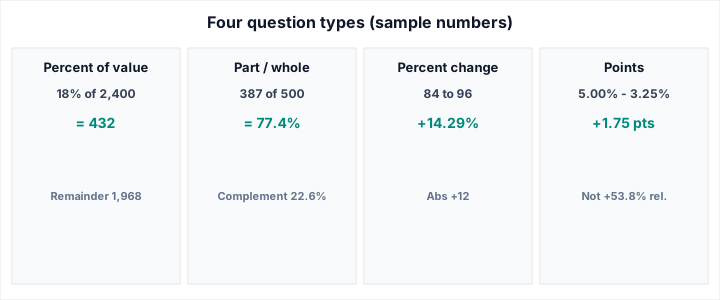
What this shows: the four question types side by side so teams pick the right structure before they type numbers.
Assumptions (illustrative): 18% of 2,400; 387 of 500; 84 → 96; 3.25% vs 5.00% rates.
Representative outputs: 432; 77.4%; +14.29%; +1.75 points—always recompute in the live tool before citing in contracts.
Four question types—and the failure mode when you pick the wrong one
Percent of value answers “How much is this rate when applied to this base?” That is the right frame for consumption taxes added to a subtotal, service charges on an invoice, or a royalty applied to net receipts. If you mistakenly model it as a percent change against last month’s total, you double-count narrative momentum.
Part versus whole is the language of attainment and composition: survey responses, pipeline coverage, defect rates, or category mix. The denominator is doing real work—if it shifts between periods, your percent can move even when the numerator is flat. When you need linguistic counts before converting to percents, run a quick total in our word counter for long-form copy, then return here for the ratio.
Percent change compares eras: quarter over quarter, week over week, before-and-after a pricing test. It is volatile near zero baselines; if the old value is tiny, a modest absolute move looks like a astronomical percent. That is not an error in the formula—it is a signal to report absolutes or to choose a different baseline.
Percentage points subtract two percentages as printed—think policy rate moves, blended APR tiers, or headline inflation prints. Readers often confuse “up two points” with “up two percent.” They are different statements. Points preserve the vocabulary of rates; relative percent change expresses how large the move is compared to the starting rate itself.
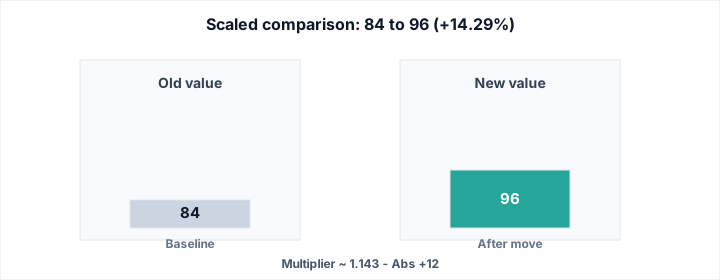
What this shows: scaled bars for an old versus new pair so a +14.29% relative move has a visual anchor.
Assumptions: old = 84, new = 96 on the same unit scale.
Check: absolute lift = +12; multiplier = 96 ÷ 84 ≈ 1.143.
How to read the KPI dashboard without drowning in numbers
The headline output is what you paste into email. The secondary tiles exist to catch mislabeling: remainder-of-base after a percent slice, complement-to-100 in ratio mode, absolute delta and multipliers in change mode, and both raw rates when you work in points. If a secondary tile disagrees with your intuition, pause before you animate the chart—usually the baseline moved or the mode is wrong.
Currency formatting tracks your active locale: useful for multinational teams who think in euros in one window and dollars in another while still sharing the same formulas. Turning currency off keeps the tool honest for non-monetary quantities—index levels, population counts, or engineered measurements—where a currency glyph would mislead.
Practical checks before you publish a percent claim
State the unit once, then keep it consistent. Mixing basis points in the narrative with percents in the graphic without conversion is a frequent source of silent error. If you compare growth rates across divisions with very different scales, consider normalizing with a growth scenario that includes contribution timing—not because the percent tool is wrong, but because finance outcomes are path-dependent.
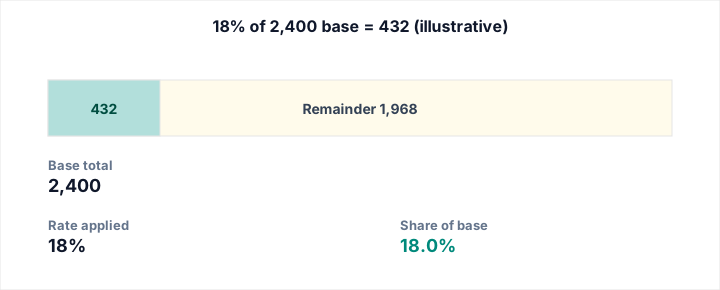
What this shows: a monetary base with an 18% slice highlighted to 432, remainder 1,968.
Assumptions: base 2,400; rate 18%; currency labels illustrative.
Use case: subtotal lines, service fees, or VAT-style presentation checks—verify jurisdiction rules separately.
Formulas, precision, and the stories they cannot tell alone
Percent of a value is (p / 100) × b. Part-to-whole is (a / b) × 100 when b ≠ 0. Relative change is ((new − old) / old) × 100 when old ≠ 0. Points are rate₂ − rate₁ with both rates already expressed in the same percent unit.
Rounding is a communications choice, not a mathematical imperative. Regulatory contexts may demand specific decimal places; slide decks may want integers. The live calculator keeps enough precision internally so you can round late—after you know the audience.
For body-weight context where percent change shows up in goals, pair numeric hygiene with clinical nuance using our BMI calculator—the percent tool will not replace screening guidance, but it can express progress in the language patients and coaches already use.
Related calculators and next steps
- Investment calculator — layer rates, contributions, and horizons when percents feed long-term wealth plans.
- Loan calculator — translate quoted APR into payment pressure and interest cost.
- BMI calculator — keep health narratives numerate without mixing units.
- Word counter — stabilize text totals before you convert them into ratios or completion percents.