Two's Complement Calculator
Convert any signed integer to two's complement binary and back. Detect overflow, perform binary addition, and visualize bit patterns for 4, 8, 16, and 32-bit architectures — with complete step-by-step derivation.
Two's Complement Calculator
Decimal ↔ Binary · Bit Visualization · Addition & Overflow Detection
What Is Two's Complement?
Two's complement is the most widely used method for representing signed integers in binary computer systems. Unlike unsigned binary (which can only represent non-negative numbers), two's complement allows a fixed-width binary string to encode both positive and negative integers using a simple, elegant mathematical trick.
In an n-bit two's complement system, non-negative numbers are represented exactly as in standard binary. For negative numbers, the representation is obtained by inverting all bits (the one's complement) and adding 1. This seemingly simple operation has profound consequences: it allows a single hardware adder circuit to handle both addition and subtraction, which is why virtually every modern CPU uses two's complement internally.
The key distinguishing feature of two's complement is that the most significant bit (MSB) acts as a sign bit: 0 means positive (or zero), 1 means negative. Unlike sign-magnitude representation (which has two zeros: +0 and −0), two's complement has exactly one representation for zero and a symmetric, consistent arithmetic.
Why Two's Complement Instead of Sign-Magnitude?
Computer architects had several options for representing negative numbers. Two's complement won out over alternatives for critical reasons:
- Single zero: Sign-magnitude has both +0 (00000000) and −0 (10000000), creating hardware complexity. Two's complement has exactly one zero: 00000000.
- Unified addition circuit: With two's complement, subtraction A − B is simply A + (two's complement of B). No special subtraction hardware is needed — the same adder handles everything.
- No end-around carry: One's complement addition requires adding the carry-out back to the result. Two's complement has no such complication — carry-out is simply discarded.
- Efficient overflow detection: Overflow in two's complement addition is detected by checking if the sign bits of both operands are equal but differ from the result's sign bit.
- Maximum range: For n bits, two's complement represents −2n−1 to 2n−1−1, giving the widest possible symmetric range for signed arithmetic.
Formula & Algorithm
The two's complement of a number n in an n-bit system is computed as:
- TC(n) = ~n + 1 where ~ denotes bitwise NOT (invert all bits)
- Equivalently: TC(n) = 2bits − n (modular arithmetic)
The step-by-step algorithm to convert a negative decimal to two's complement binary:
- Step 1 — Absolute value: Take the absolute value of the negative number.
- Step 2 — Binary conversion: Convert the absolute value to binary, padded to the required bit width.
- Step 3 — Invert bits: Flip every bit (0 → 1, 1 → 0). This is the one's complement.
- Step 4 — Add 1: Add 1 to the one's complement result using binary addition. The final result is the two's complement.
To convert two's complement binary back to decimal:
- If MSB = 0: the number is positive. Read the binary directly as an unsigned integer.
- If MSB = 1: the number is negative. Invert all bits, add 1, then negate. This recovers the original magnitude.
How to Use This Calculator
The Two's Complement Calculator supports three powerful modes:
- Step 1 — Choose mode: Select Decimal → Binary, Binary → Decimal, or Binary Addition from the mode tabs.
- Step 2 — Select bit width: Choose 4, 8, 16, or 32 bits to match your target architecture. The range display updates automatically.
- Step 3 — Enter input: For decimal mode, enter any signed integer within the selected range. For binary mode, enter 0s and 1s (auto-padded to bit width). For addition, enter two signed integers.
- Step 4 — Click Convert: The calculator computes the result, displays the bit visualization (with sign bit highlighted), and shows a complete step-by-step derivation.
- Step 5 — Read results: KPI cards show two's complement binary, one's complement, hex, and octal. For addition mode, overflow is explicitly flagged.
- Step 6 — Copy values: Click any KPI card to copy its value to clipboard.
All Three Calculation Modes
Each mode is designed for a specific computer science workflow:
- Decimal → Binary: The primary mode. Enter any signed integer (e.g., −13, 127, −128) and get the two's complement binary, one's complement, hex, and octal representations instantly. Positive numbers are encoded directly; negative numbers use the invert-and-add-1 algorithm.
- Binary → Decimal: Enter a binary string in two's complement format and decode it to a signed decimal. The calculator checks the MSB to determine sign, then reverses the algorithm if negative. Useful for debugging binary data or interpreting processor register contents.
- Binary Addition with Overflow Detection: Enter two signed decimal operands. The calculator converts both to two's complement binary, performs the addition bit-by-bit (with carry ripple), detects overflow using the sign-bit comparison rule, and shows the complete binary addition workthrough.
Bit Width & Number Range
The bit width determines how many distinct values can be represented and the range of valid signed integers:
- 4-bit: Range −8 to +7 (16 values). Used in nibble-based systems, BCD digits, and educational examples.
- 8-bit: Range −128 to +127 (256 values). The
char/int8_ttype in C. Used in microcontrollers (Arduino, AVR), pixel color components, ASCII encoding. - 16-bit: Range −32,768 to +32,767 (65,536 values). The
short/int16_ttype. Used in audio samples (CD quality), original x86 registers, many DSP applications. - 32-bit: Range −2,147,483,648 to +2,147,483,647 (~±2.1 billion). The standard
int/int32_ttype. Used in modern CPUs, graphics (RGBA color), IPv4 addresses, most general-purpose computing.
The formula for range is: minimum = −2n−1, maximum = 2n−1 − 1. Note the asymmetry: there is one more negative value than positive because zero is classified as non-negative (MSB = 0).
Overflow Detection
Integer overflow occurs when an arithmetic result falls outside the representable range for the given bit width. In two's complement addition, the overflow rule is:
- Overflow occurs if and only if both operands have the same sign AND the result has the opposite sign.
- Positive + Positive = Negative → OVERFLOW (positive overflow)
- Negative + Negative = Positive → OVERFLOW (negative overflow)
- Positive + Negative → NEVER overflows (the result is always within range)
Note that carry-out from the MSB does NOT directly indicate overflow in two's complement — it must be ignored (discarded) in fixed-width arithmetic. Overflow is purely determined by the sign bit relationship.
Example: In 8-bit, 127 + 1 = −128 (overflow). Binary: 01111111 + 00000001 = 10000000. Both operands positive (MSB = 0), result negative (MSB = 1) → overflow detected.
Worked Examples
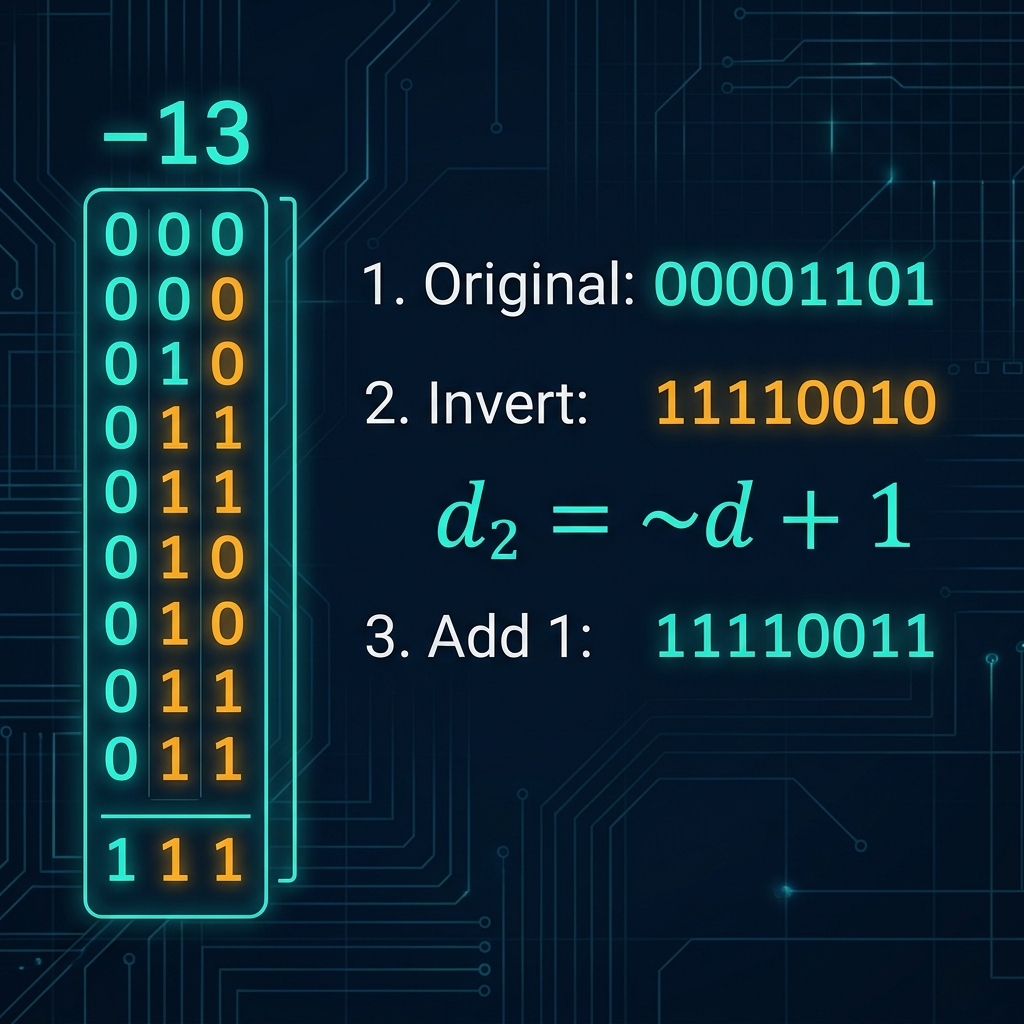
- Convert −13 to 8-bit two's complement: |−13| = 13 = 00001101₂. Invert: 11110010. Add 1: 11110011. Verify: interpret 11110011 → MSB=1 (neg), subtract 1: 11110010, invert: 00001101 = 13, negate: −13. ✓
- Interpret 10110100 (8-bit): MSB=1 (negative). Subtract 1: 10110011. Invert: 01001100 = 76. Result: −76.
- Add −5 + 3 in 8-bit: −5 = 11111011, +3 = 00000011. Sum: 11111110. MSB=1 (neg). Interpret: −2. Verify: −5 + 3 = −2 ✓. No overflow (different sign operands).
- Overflow: 100 + 50 (8-bit): 01100100 + 00110010 = 10010110. Both positive MSB=0, result MSB=1 → OVERFLOW. Mathematical sum 150 > 127 (8-bit max).
- 16-bit: −1000 to binary: 1000 = 0000001111101000₂. Invert: 1111110000010111. Add 1: 1111110000011000 = 0xFC18.
Real-World Applications
Two's complement is fundamental to virtually all digital computing:
- CPU arithmetic units: Every modern processor (x86, ARM, RISC-V, MIPS) uses two's complement for integer arithmetic. The ALU (Arithmetic Logic Unit) adds two's complement numbers using a single hardware adder — no separate subtraction circuit needed.
- Programming languages: In C/C++, Java, Python, and most languages,
int,short,long, andcharare all stored as two's complement. The expression-xcomputes the two's complement of x. - Digital signal processing: Audio samples, filter coefficients, and FFT computations use signed 16-bit or 32-bit two's complement integers. Understanding two's complement is essential for fixed-point DSP programming.
- Network protocols: TCP/IP sequence numbers, checksum fields, and many protocol fields use fixed-width binary arithmetic that follows two's complement rules for wrapping and comparison.
- Embedded systems: Microcontrollers (AVR, STM32, PIC) use 8-bit two's complement for temperature sensors, ADC readings, and motor control PWM values. Register overflow is a critical bug source in embedded firmware.
- Security & cryptography: Integer overflow vulnerabilities (buffer overflows, integer wraparound attacks) are among the most exploited security flaws. Understanding two's complement overflow is essential for secure code review.
- GPU compute shaders: HLSL/GLSL integer operations use two's complement. Shader programmers must understand overflow behavior for correct bit manipulation and hash functions.
Related Calculators
- Log Base 2 Calculator — log₂ tells you how many bits are needed to represent a number. For n distinct values, you need ⌈log₂(n)⌉ bits.
- Exponent Calculator — The range of an n-bit two's complement system is −2n−1 to 2n−1−1. Calculate exact powers of 2 for any bit width.
- Factor Calculator — Understand divisibility and factors in integer arithmetic, directly applicable to modular arithmetic used in two's complement overflow analysis.
- Significant Figures Calculator — When converting between binary and decimal, significant figures determine how precisely a value is reported in each base system.
- Antilog Calculator — Inverse logarithm operations help compute powers of 2, which define two's complement ranges: range = 2n values for n bits.
- Pythagorean Theorem Calculator — Binary arithmetic underpins all computer math, including the integer arithmetic used to compute Pythagorean triples in embedded geometry engines.
Frequently Asked Questions about Two's Complement Calculator
What is two's complement and why is it used?
Two's complement is the standard method for representing signed integers in binary computer systems. It is computed as ∼n + 1 (invert all bits, then add 1). It is universally preferred because: (1) there is exactly one representation of zero, (2) addition and subtraction use the same hardware circuit, (3) overflow is easy to detect via sign-bit comparison, and (4) it provides the widest possible integer range for a given bit width.
How do I convert a negative decimal to two's complement binary?
Follow four steps: (1) Take the absolute value of the negative number. (2) Convert it to binary, padded to your target bit width (e.g., 8 bits). (3) Invert all bits (0→1, 1→0) — this is the one's complement. (4) Add 1 to the result using binary addition. Example: −13 in 8-bit: |13| = 00001101 → invert: 11110010 → add 1: 11110011. Verify: 11110011 decodes back to −13.
How do I convert two's complement binary back to decimal?
Check the most significant bit (MSB, leftmost). If MSB = 0: the number is positive — read the binary as a normal unsigned integer. If MSB = 1: the number is negative — invert all bits and add 1 to get the magnitude, then negate. Example: 10110100 (8-bit) → MSB=1 (negative) → subtract 1: 10110011 → invert: 01001100 = 76 → result: −76.
What is overflow in two's complement addition?
Overflow occurs when the sum of two numbers exceeds the representable range for the bit width. The rule: overflow happens if and only if both operands have the same sign AND the result has the opposite sign. Example (8-bit): 127 + 1 = −128 in binary (01111111 + 00000001 = 10000000), both operands positive but result negative — overflow! Important: carry-out from the MSB does NOT indicate overflow in two's complement — it is discarded.
What are the number ranges for different bit widths?
For n-bit two's complement: minimum = −2^(n−1), maximum = 2^(n−1)−1. Specifically: 4-bit: −8 to +7 (16 values). 8-bit: −128 to +127 (256 values, used for char/int8_t). 16-bit: −32,768 to +32,767 (65,536 values, used for short/int16_t, CD audio). 32-bit: −2,147,483,648 to +2,147,483,647 (≈2.1 billion, the standard int type). The asymmetry (one more negative than positive) arises because zero is classified as non-negative (MSB=0).
Why is there one more negative number than positive in two's complement?
In two's complement, MSB=0 means non-negative (includes zero), and MSB=1 means negative. For n bits, there are 2^(n−1) bit patterns starting with 0 (including 0 itself) and 2^(n−1) patterns starting with 1. Since zero takes one of the positive-side slots, there are only 2^(n−1)−1 positive values but 2^(n−1) negative values. This is why 8-bit can represent −128 but not +128. The minimum value −2^(n−1) has the special property that its two's complement is itself (it is its own negation).