Why reading time belongs in your editorial checklist
This reading time calculator turns word count and pacing assumptions into minutes you can plan against: silent reading for on-page UX, aloud minutes for narration, and page equivalents for print-style estimates—without treating “average speed” as a single universal truth.
Editors ship schedules, not just sentences. When a draft grows from twelve hundred words to two thousand, the calendar impact is rarely linear in people’s heads—yet the clock moves anyway. A disciplined estimate helps you align writer capacity, legal review windows, stakeholder reads, and launch timing with the same numbers your audience will experience on the page.
The workflow is intentionally simple: establish a defensible silent words-per-minute, separate aloud pacing for scripts and events, and keep your words-per-page rule explicit so “how many pages” does not silently drift between teams. If you are still validating length before deeper cleanup, pair this page with our word counter for token-accurate totals, then return here to translate totals into time and narrative pacing.
Many teams underestimate skim friction on dense pages. When headings are long, sentences stack with nested clauses, or tables interrupt flow, real readers slow down even if the raw word count looks identical to a lighter article. Treat WPM as a scenario dial: conservative for policy, moderate for product education, and higher only when structure, typography, and audience familiarity truly support it.
Publishing calendars fail for predictable reasons: approvals arrive late, reviewers discover length only after the fact, and marketing promises a ship date that assumes everyone reads at the speed of optimism. Putting minutes next to word count gives meeting rooms a shared vocabulary. Instead of debating whether a piece feels long, you can ask whether eight minutes of attention fits the channel, the campaign window, and the seniority of the reader who still has not opened the document.
Stakeholder reads are not identical to public reads. An executive may jump to recommendations, scan risks, and skip examples, while a first-time customer may read sequentially. Your calculator estimate is a fair baseline for full-text reading—use it to book time on calendars, not to claim precision about segmented behavior. When you need tighter copy before measuring minutes, iterate structure first; then re-check totals so you do not polish sentences that will never survive the outline stage.
For organic search, length interacts with usefulness, not with a magic threshold. A thorough answer can earn attention even when it is longer—as long as headings, summaries, and scannable lists respect the reader’s time. This tool helps you state honest duration next to honest depth: if a topic requires twelve minutes of careful reading, say so in the intro and earn the right to those minutes with clarity. If you only need four minutes, tighten until the estimate matches the promise.
Academic and professional audiences often consume PDFs with different posture than mobile web readers. If your primary surface is a small screen, assume more friction: shorter lines, more thumb scrolling, and more context switching. You can reflect that reality by choosing a lower WPM even when the prose itself is not difficult. Conversely, a well-typeset longform article on a large display may justify a slightly higher pace when paragraphs breathe and navigation is obvious.
Inputs, pacing rules, and what each control changes
Word count is the backbone. Paste a draft to count words automatically, or type a total when your CMS already knows the figure. If you are normalizing spacing before measuring, run a quick pass with remove extra spaces so counts stay stable across exports.
Silent WPM anchors the primary “time on page” estimate. If your organization publishes mixed formats, consider documenting two internal defaults—one for consumer prose and one for technical review—rather than forcing a single company-wide number that fits nothing well.
Words per page converts length into a familiar editorial unit. Publishing teams still negotiate in pages even when the web ships in scrolling columns; stating the rule removes ambiguity when someone asks for “about six pages.”
Optional hourly value does not price your content. It helps teams think about loaded review time—legal, compliance, or executive reads—when those hours have real opportunity cost. If the field is zero, the tool keeps the focus purely on reader pacing.
When you reorder lists or rebuild sections, sort text lines can help you compare outline versions quickly before you lock a final structure—then you can re-check minutes here after substantive edits.
KPI dashboard, charts, and how to read them
The on-page KPI row summarizes the story at a glance: how large the draft is, how long silent reading takes at your chosen WPM, how many “pages” that implies, how long aloud pacing runs at a separate baseline, and—if enabled—a rough dollar signal for review hours. The charts stress-test assumptions: sensitivity across three WPM levels, silent versus aloud, and a words-to-minutes curve that shows how time climbs as length grows.
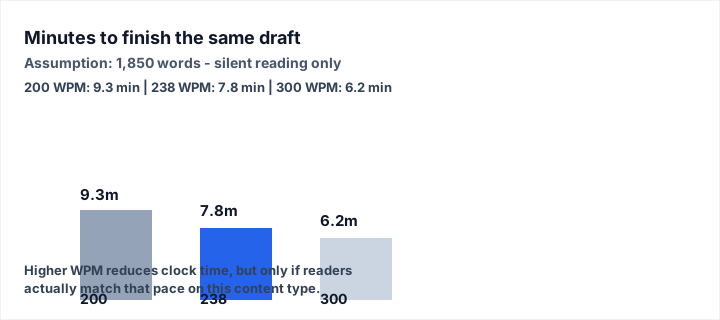
What this shows: how sensitive clock time is to the WPM you assume for the same draft.
Assumptions: 1,850 words, silent reading only, three pacing levels (200 / 238 / 300 WPM).
Representative outputs: about 9.3 minutes, 7.8 minutes, and 6.2 minutes respectively—recompute in the tool before citing in formal documentation.
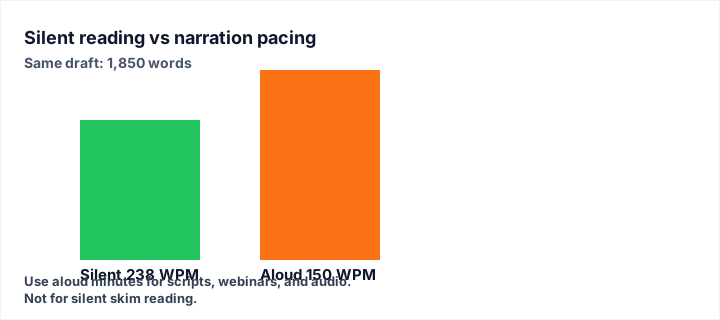
What this shows: why narration, webinars, and scripts need a different planning lane than silent reading.
Assumptions: 1,850 words; silent estimate at 238 WPM; aloud estimate at 150 WPM.
Representative outputs: about 7.8 silent minutes versus 12.3 aloud minutes—verify before locking run-of-show timing.
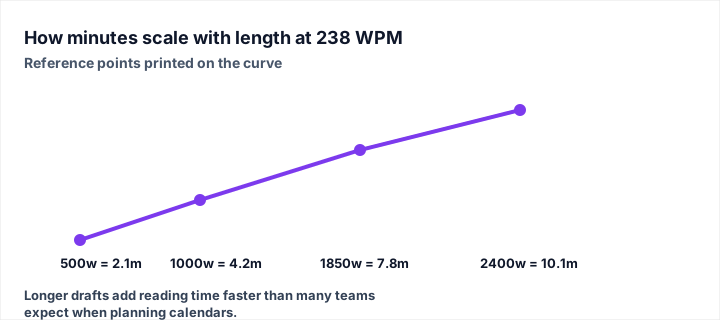
What this shows: how minutes accumulate as length grows when WPM is held constant.
Assumptions: silent pacing fixed at 238 WPM; reference word totals 500, 1,000, 1,850, and 2,400 words.
Representative outputs: about 2.1, 4.2, 7.8, and 10.1 minutes—use your live inputs for final decisions.
Depth, limitations, and when to re-run the estimate
Reading time models are planning instruments, not audience measurements. Actual time-on-page will vary with layout, device, interruptions, and motivation. If your goal is product analytics, pair these estimates with instrumentation; if your goal is editorial fairness—giving reviewers and readers realistic expectations—this calculator gives you a shared baseline.
Localization and complex typography can also shift effective pace. If you prepare mirrored copy or experimental string layouts, reverse text modes can help QA line order without changing meaning—then re-check minutes after translation because word boundaries and line breaks move.
Re-run whenever the draft meaningfully changes: not only when words go up or down, but when you add a dense table, insert a mandatory disclosure block, or replace skimmable bullets with long paragraphs. Those edits change cognitive load even when the word count looks similar.
Related tools and internal resources
- Word Counter — measure totals and tighten drafts before you translate words into minutes.
- Remove Extra Spaces — stabilize spacing so word totals stay comparable across exports.
- Sort Text Lines — reorganize lists and outlines quickly while you iterate on structure.
- Reverse Text — QA mirrored strings and line order without altering your measurement workflow.