Why structured text comparison belongs in every serious review loop
This online text compare tool answers a narrow but expensive question: when two plain-text versions of the same artifact exist, what exactly moved at the line level, how large is the drift, and what language can you use in email or tickets to point reviewers to the same rows? It is built for policies, FAQs, microcopy exports, changelog drafts, and lightweight config snippets—places where track-changes is unavailable but accountability still matters.
Editors use comparison to separate cosmetic edits from substantive risk. A wording tweak in a return window is not the same as a silent insertion of a liability cap. Product teams compare UI copy between design tools and repository exports to catch truncation or localization drift. Engineers diff environment templates before promote. The common thread is shared mental alignment: everyone should be able to see the same delta without installing a desktop merge tool.
Pair comparison with hygiene passes so you are not diffing formatting noise. When exports introduce irregular spaces, run remove extra spaces first. When case differs but meaning should match, toggle ignore case here, or normalize with our case converter before you compare. For JSON or log payloads where structure matters, follow with the JSON formatter so keys and commas line up before you interpret textual differences.
Long documents also benefit from line-level organization upstream. If you are reconciling two inventories of headings or URLs, sort text lines can surface accidental duplicates, while remove duplicate lines helps you collapse repeated research notes before you treat the remainder as authoritative input. Those steps reduce false positives in any diff: you compare ideas, not copy-paste accidents.
Metrics dashboard: similarity, matched lines, and directional counts
The KPI strip is intentionally blunt. Similarity summarizes how much of the combined line mass still aligns after your matching rules. It is not a semantic score: two sentences can mean different things while registering as “close” if tokens overlap, and two legally distinct clauses can sit on lines that look identical until counsel reads the qualifiers.
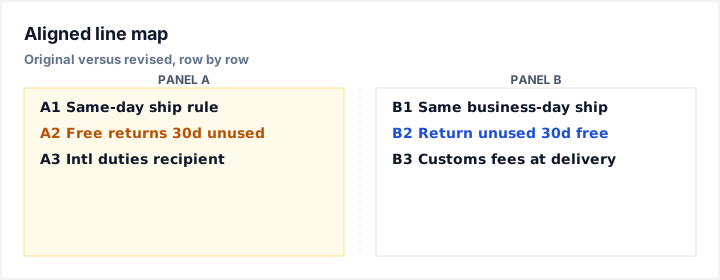
Matched lines are rows where the comparison key is equal after your options. Large matched counts with a handful of change pairs usually indicate surgical edits—good for typo sweeps or tone adjustments. Changed pairs are replacements where one line in A maps to a different line in B in sequence; they deserve the closest read. Lines only in B and lines only in A highlight insertions and deletions that do not have a counterpart on the other side.
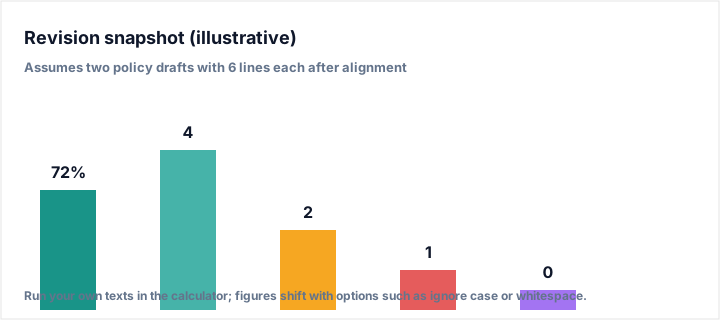
What this shows: how a single revision pass might distribute across headline KPIs—useful when you brief stakeholders who will not read the full table.
Assumptions: illustrative two-column policy draft with six lines each; numbers change when you paste real text or toggle trim, whitespace, or case rules.
Representative outputs: verify in the live calculator before citing figures in contracts or external memos.
Reading similarity alongside human judgment
Treat similarity as a triage dial. When it drops sharply after a small paste, you probably introduced a paragraph break or converted a wrapped sentence into a single line—fix structure, then re-run. When similarity stays high but changed pairs spike, you may be looking at synonym substitution across many lines: fine for marketing polish, risky for regulated disclosures where defined terms must stay exact.
Workflows for legal, product, and editorial teams
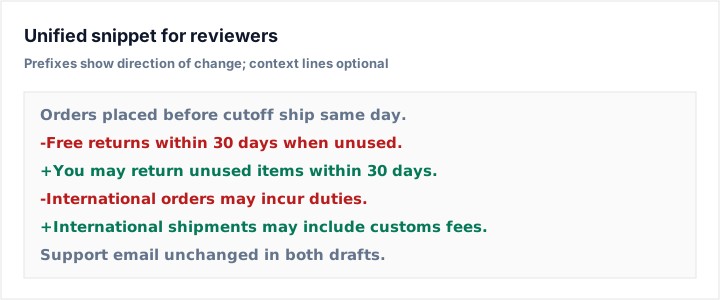
Legal and compliance. Paste the last approved version into A and the proposed revision into B. Start with strict matching (no ignore options) to see raw drift, then selectively relax whitespace or case to isolate substantive edits. Copy the unified snippet into your matter log with the comparison options noted in prose so a later reviewer can reproduce the same view.
Product and UX writing. Compare CMS exports to staging copy to catch truncation, smart quotes, or HTML entity differences that survived export. When character limits bind marketing surfaces, pair this pass with the word counter so you know whether a shorter line is intentional or an artifact of the export pipeline.
Engineering and operations. Use line mode for small config fragments or allowlists. For larger structured files, prefer dedicated structural diff in your VCS; use this tool when stakeholders exchange snippets in chat and you need a fast, browser-local answer without granting repository access.
Keyword coverage without stuffing
Responsible SEO pages name the task in plain language—compare text online, text diff, line by line compare—where those phrases match reader intent. The body you are reading spreads those concepts across sections so scanners and screen readers encounter them in context: metrics, workflows, limitations, and related tools. That distribution beats repeating the same head term in every paragraph, which tends to read as mechanical to humans even when parsers tolerate it.
Internal links extend that same idea: they connect readers to adjacent tasks (slug generator when URLs must shrink after copy stabilizes, reading time calculator when revised policies change how long a page takes to read). Each hop should feel like a natural next step, not a keyword stack.
Accuracy, limits, and privacy expectations
Comparison runs in your browser: text you paste stays in this session unless you explicitly copy it elsewhere. Extremely large inputs can slow the alignment step because line diff uses dynamic programming proportional to line counts; for book-length files, split by chapter or section first.
The algorithm aligns on whole lines, not intra-line character edits. Two sentences on the same line will be treated as a single unit. If you need token-level precision inside a line, split sentences manually or use an editor with character-level diff before you import results here for reporting.
Unicode and line endings from Windows, macOS, and Unix normalize to logical lines, but invisible characters (soft hyphens, unusual spaces) can still create false mismatches. When numbers disagree with intuition, paste suspect lines into a hex-friendly editor or strip odd characters before a second pass.
Related calculators and text utilities
- Remove Extra Spaces — quiet export noise before you diff.
- Case Converter — normalize capitalization when case should not affect comparison.
- Word Counter — measure length after revisions tighten copy.
- Sort Text Lines — reorganize lists before comparing stable orderings.
- Remove Duplicate Lines — dedupe research notes prior to analysis.
- JSON Formatter — structure payloads when comparing machine-readable text.