What does this SEO Checker actually check?
This SEO Checker fetches any publicly accessible web page and measures it across ten distinct on-page SEO categories—from title tag length to structured data blocks—in a single click, with no signup or rate limits required.
Most SEO checkers give you a raw pass/fail. This tool grades every finding individually so you know exactly where your page is strong and where a single fix could move the needle. The score reflects weighted impact: a missing title tag costs more than a missing Twitter Card, so your overall grade tells you what to prioritize first.
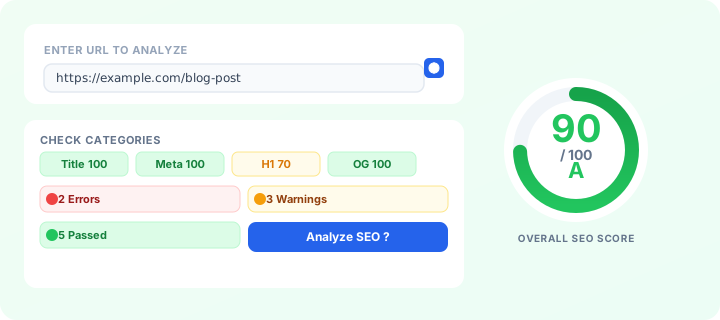
What this shows: the SEO Checker interface — paste any URL, hit Enter, and receive an instant SEO score with a grade from A to F alongside a breakdown of all check categories.
Representative output: scores and grades vary by page — a well-optimized page scores 90+ (grade A); a page with missing title tag or HTTPS scores much lower.
Search engines crawl and index pages based on signals they can extract from HTML. If your title tag is empty, search engines have no anchor text to display in search results and must guess from page content—often producing a worse result than a well-written title. Similarly, pages without a meta description fall back to auto-generated snippets that may not reflect your actual content. Running a quick check before publishing (or before a redesign) catches these gaps before they cost you organic traffic.
Pair this URL analysis with a keyword density checker to validate that your primary phrases appear in the right places, and a slug generator to audit your URL structure separately from the page-level signals this tool covers.
How to read your SEO score and what the grades mean
The score displayed (0–100) is a weighted average across all categories. The letter grade maps as follows:A is 90+, B is 80–89, C is 70–79, D is 60–69, and F is below 60. A grade of A does not mean perfection—it means no critical signals are missing and most signals are within recommended ranges.
Expand the collapsible category cards to see the specific value found on the page and a plain-English recommendation. The "Issues" panel at the top groups findings into errors (red), warnings (amber), and passes (green) so you can scan the page in seconds. Focus on the red items first, then amber, then look for the green confirmations that your previous fixes worked.
The Quick Stats row below the score ring shows total word count, character count, internal links, external links, images, and heading distribution (H1 / H2 / H3). These raw numbers are useful for diagnosing thin pages: a page with fewer than 300 words often lacks enough content for search engines to understand its topic depth.
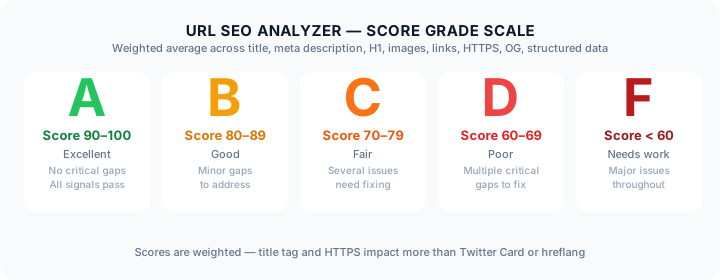
What this shows: the SEO score grade scale used by the SEO Checker — grades range from A (90–100) down to F (below 60), with color-coded progress bars and descriptive labels for each tier.
Assumptions: grades reflect weighted average across all checked categories. A missing HTTPS or title tag counts as an error and significantly reduces the score.
Why on-page SEO still matters in the era of AI answers
Search engines still rely on signals from the page itself—title, description, heading hierarchy, alt text, schema markup—to match queries to results. Even as AI overviews and featured snippets change the appearance of search results, the underlying content on your page determines whether your site is selected as a candidate for those high-visibility placements in the first place.
A page with a clear H1 that matches the search query, descriptive alt text on images, and JSON-LD structured data is more likely to be selected for rich results—featured snippets, People Also Ask boxes, image carousels— than a page where those signals are missing or contradictory. On-page optimization is the foundation; everything else builds on top of it.
Internal linking also signals topical authority. A page that links to related content within your site helps search engines understand the structure of your site and the relationships between topics. Use this tool's link inventory to audit whether your important pages have sufficient internal navigation pointing to them.
Common SEO issues this tool catches and how to fix them
Missing or wrong-length title tag. The tool flags titles under 30 characters (too short to convey intent) and over 60 characters (gets truncated in search results with an ellipsis). Fix: write a concise title between 50 and 60 characters that includes your primary keyword near the start.
Missing meta description. While Google often rewrites descriptions, a well-written meta description improves click-through rate from search results. Write 150–160 characters that summarize the page value and include a call to action.
Missing or duplicate H1 tags. Every page needs exactly one H1 that reflects its main topic. Multiple H1s confuse search engines about page hierarchy. If you have zero H1s, the page may lack a clear topical anchor.
Images without alt text. Alt attributes are required for accessibility and help search engines understand image content for image search indexing. Every meaningful image should have descriptive alt text. Decorative images can use an empty alt attribute (alt="") to be skipped by screen readers.
Missing Open Graph tags. Without og:title, og:description, and og:image, social shares will use unpredictable defaults. Add these meta tags to control how your page appears when shared on Facebook, LinkedIn, and messaging apps.
No JSON-LD structured data. Structured data helps search engines understand entity relationships and can enable rich result features. Use JSON Formatter to validate and pretty-print your schema markup, and check it with this SEO checker to confirm it is present and parseable.
What this shows: how the same page appears differently on Facebook and X (Twitter) depending on Open Graph and Twitter Card meta tags — illustrating why the SEO Checker checks social meta tags alongside traditional on-page SEO signals.
Assumptions: preview is illustrative. The actual social preview depends on the meta tag values found on the analyzed URL.
How to improve your overall SEO score step by step
Start with the errors (red items). Fix your title tag and meta description first—these are the highest-impact changes you can make in minutes. Then address missing H1s, images without alt text, and missing Open Graph tags. Each of these is a one-time fix that compounds over the life of the page.
Next, review the warnings (amber items). Add structured data markup for your page type. If you run a multilingual site, add hreflang tags pointing to alternate language versions. Check that your canonical URL points to the preferred version and is not a relative URL.
Finally, confirm your passes (green items) are genuinely passing, not just scored high because the element is absent. A page with zero images scores 100 for images—but that is not a strength, it is simply a non-issue for that specific page type. Use the heading inventory to ensure your H2 and H3 tags reflect a logical content hierarchy.
Run the analysis again after making changes to see your score move. Even fixing two or three issues can shift a grade from C to B. Keep this SEO Checker bookmarked and check key pages monthly as part of your routine site health audit.
What this shows: every on-page SEO element the SEO Checker checks — from title tag and meta description to Open Graph, Twitter Card, JSON-LD structured data, and hreflang tags. Color-coded pass, warning, and error states make it easy to prioritize fixes.
Assumptions: all elements are extracted directly from the page HTML source. Scores are weighted by SEO impact — title tag and HTTPS matter more than Twitter Card or hreflang.
What this shows: a practical four-step SEO improvement workflow — enter any URL, fix errors first (title tag, meta description, H1, HTTPS), then warnings (alt text, Open Graph, structured data), then retest to verify the score improved from F to A.
Assumptions: illustrative progression. Actual score improvement depends on how many issues the page has before optimization.
Related tools
- Keyword Density Checker — measure keyword focus and distribution across your page content.
- Slug Generator — create clean, keyword-rich URL slugs with customizable separators and stop-word removal.
- JSON Formatter — validate, format, and debug JSON with syntax highlighting and export to XML, CSV, and YAML.
- Word Counter — count words, characters, sentences, and paragraphs with reading time estimates.
- Reading Time Calculator — estimate how long it takes to read any text based on average reading speed.